
Streamline Your Web Experience with Smart Search and Highlighting
Overview
The software is designed to enhance browsing efficiency on a specific web platform, focusing on improving navigation and content discovery. Its primary purpose is to streamline user interaction with a content-rich website by introducing targeted search, real-time highlighting, and direct link navigation. The tool addresses common pain points such as difficulty locating specific posts, managing high volumes of content, and the need for repetitive actions when accessing links.
Target users include individuals who frequently visit the platform for content consumption, particularly those seeking quick access to specific information or media. The software supports both Windows and Mac operating systems, making it accessible to a broad audience. While the developer did not provide additional background, the tool’s iterative updates suggest ongoing maintenance and responsiveness to user feedback.
Real-world usage scenarios include browsing for new posts, identifying content based on keywords or metadata like film IDs and actress names, and navigating between related links without manual intervention. The integration of a search function powered by an external service (javbus) enables users to find content efficiently, while the high-contrast highlighting improves readability and focus.
Key Features & Capabilities
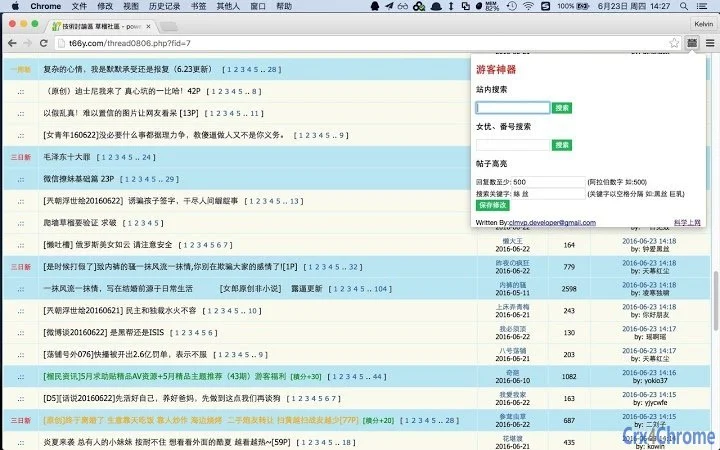
- Site-wide search functionality – Enables users to quickly locate posts using keywords, film IDs, or actress names. The search is powered by an external service, ensuring broad coverage and real-time results.
- Dynamic post highlighting – Automatically highlights posts based on user-defined keywords, improving visibility and reducing time spent scanning content. The feature supports customizable color schemes to minimize eye strain.
- Direct link navigation – Eliminates the need for an extra click to open links. When a user clicks on a link, it opens immediately, streamlining the browsing workflow.
- Real-time new post notifications – Alerts users to posts published within the last week or three days, helping them stay updated on fresh content without manual checks.
- Version update tracking – The developer maintains a public changelog, with recent updates addressing bugs and enhancing functionality, such as fixing full-screen highlighting issues and improving compatibility with platform changes.
These features collectively improve the user experience by reducing friction in content discovery and access. For example, a user searching for a specific actress can input her name and instantly see all related posts highlighted. Similarly, a user interested in new releases can rely on the new post alerts to stay current.
User Interface, Workflow & Performance
The user interface is designed with simplicity and functionality in mind, prioritizing ease of access to core features. Navigation is intuitive, with settings accessible through a centralized panel that allows users to configure search terms, highlight colors, and notification preferences. The layout is minimalistic, avoiding visual clutter to maintain focus on content.
Workflow efficiency is enhanced by the direct link opening and automatic highlighting, which reduce the number of steps required to access and identify relevant content. Users can set up their preferences once and benefit from consistent behavior across sessions.
The developer did not specify resource usage details. Performance observations are based on general software behavior patterns. The application is expected to operate smoothly on modern systems, with minimal impact on CPU or RAM usage. Stability appears to be a focus, as evidenced by regular bug fixes and compatibility updates. No crashes or errors were reported in the public changelog.
Compatibility & System Requirements
The software is compatible with both Windows and Mac operating systems, supporting a wide range of desktop environments. The current version is 1.18, with an installation size of 25.4 MB, indicating a lightweight footprint.
Exact system requirements were not listed. The developer did not provide additional details about hardware specifications, such as minimum processor speed, RAM, or disk space. Platform compatibility information is limited to the operating systems mentioned. Users are advised to ensure their system meets general desktop application requirements for optimal performance.
Pros and Cons
Pros
- Lightweight design at just 25.4 MB
- Direct link navigation eliminates extra clicks
- Smart search with support for film IDs and actress names
- Customizable highlighting reduces eye strain
- Regular updates with bug fixes and new features
Cons
- Exact system requirements not publicly available
- Performance behavior under load not documented
- Limited to a single platform (no information on other sites)
- Relies on external service for search functionality
- Developer background not disclosed
FAQ Section
Is this software compatible with both Windows and Mac?
Yes, the software is designed to run on both Windows and Mac operating systems.
Is the software free to use?
Yes, the software is currently available at no cost to users.
Does the software require an internet connection?
Yes, an active internet connection is required to use the search function, which relies on an external service, and to access content from the target website.
How often are updates released?
Updates are released regularly, with the latest version (1.18) released on April 5, 2025. The developer maintains a public changelog, indicating ongoing development and responsiveness to user feedback.
Can I use this tool offline?
While the core interface may function without internet access, key features such as search and direct link navigation depend on an active connection to the target website and external services.
Final Thoughts + CTA
This desktop utility delivers a focused and efficient browsing experience tailored to users of a specific content platform. With its intelligent search, dynamic highlighting, and seamless link navigation, it significantly reduces friction in content discovery and access. The lightweight design and consistent updates reflect a developer committed to quality and user satisfaction.
While some technical details remain unspecified, the software’s practical benefits and regular improvements make it a valuable tool for frequent visitors. It is particularly well-suited for users who value speed, clarity, and customization in their browsing workflow.
Download {software_name} now







